Creating Arch AUR Package
Created on Mon. 16 March 2026
Another month another project! This time around I will write about how I build a AUR package for my good friend jakob friedl.
Jakob wrote an amazing tool based from our work on Havoc called conquest. I used it a little and thought it would be a great opportunity for me to make a AUR package for it so that I can then feature it inside of p3ng0s instead of Havoc since that is now not supported as well as it used to be.
The basics of the AUR
So obviously I main Arch Linux since that is what p3ng0s is based on. Whats great about arch is how it decides to package it's software it's actually quite simple once you get the hang of it. The AUR or Arch User Repository is actually a glorified compilation of bash build scripts to install software with. When you run the paru -S package command the paru tool actually does the following more or less:
          git clone https://aur.archlinux.org/package.git
          cd package/
          makepkg -rsi
So it's honestly not that complicated inside of every AUR package there is a magic file name PKGBUILD that has just a bunch of bash commands that will prepare the package so that pacman can take over and install the program in the correct folder. Bellow you can see a sample PKGBUILD file if you look at the build and package function you'll see that it's nothing crazy just simple bash commands:
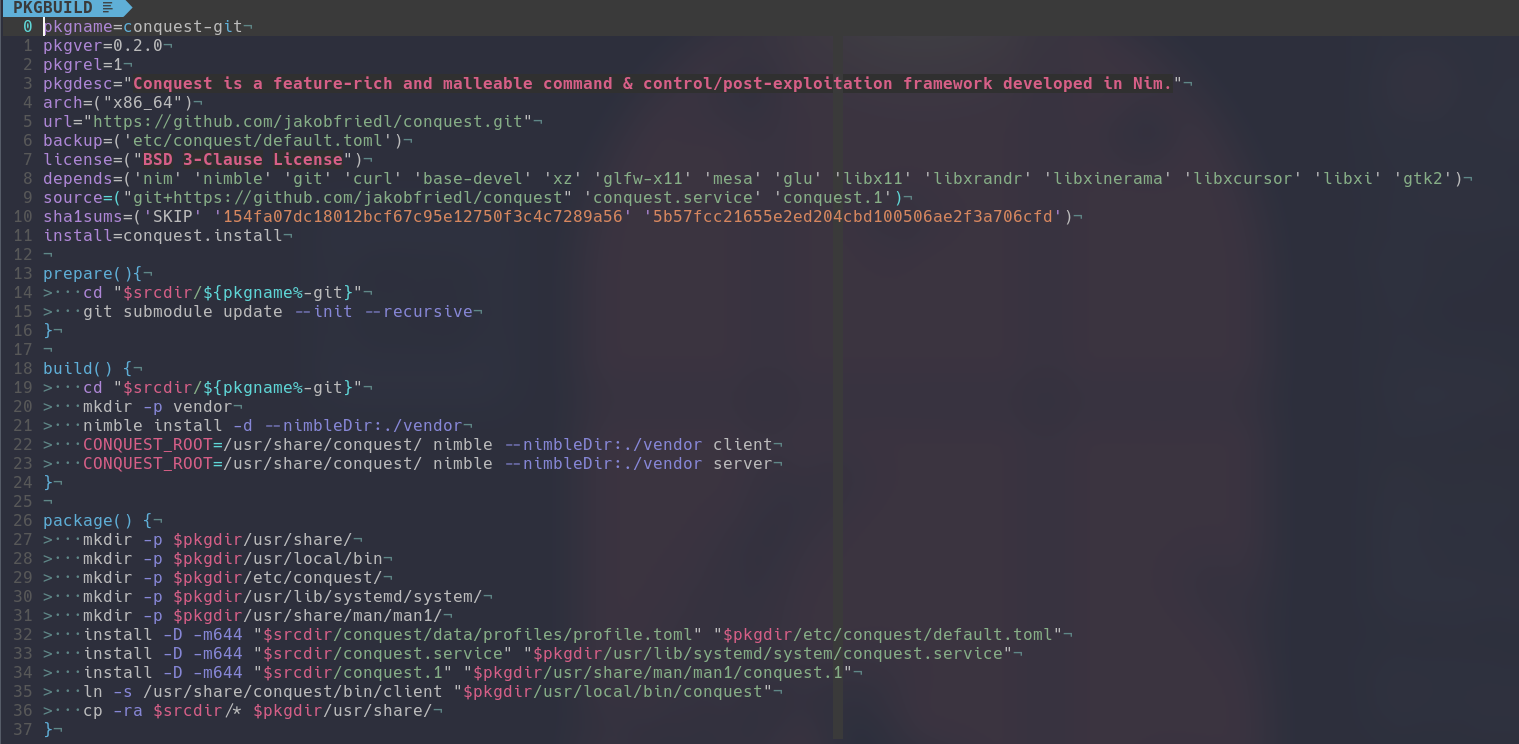
Usually the makepkg command will create a .pkg.tar.zst file which is a tarball that preserve the mode bits so the +r +w +x stuff.
Conquest
So this blog post is not an in depth tutorial on conquest I am expecting you to at least know the following. Conquest is a C2 Framework. So it has a client, a server and different agents to infect machines if you are curious about the conquest project on it's own read more here. Jakob has great resources explaining how he built his C2.

Now like mentioned before conquest is a C2 and it has a server I thought it would be great that if I install conquest from the AUR it would then install the project to a nice folder with a systemd service to manage the server and a simple command to just run the client. I got this idea because when using p3ng0s or doing a ctf having 3-4 terminals open to run servers is a pain systemd is designed to run applications in the background properly it's arch linux friendly and it would make for a way cleaner implementation.
Packaging the project
The first thing I had to do to create the AUR package is to do a local package and test out the project. So after getting all the dependencies for conquest listed out and installed on my machine I could then start work on the package. On the AUR there are 2 types of packages ones with just the name of the tool and those that end with -git.
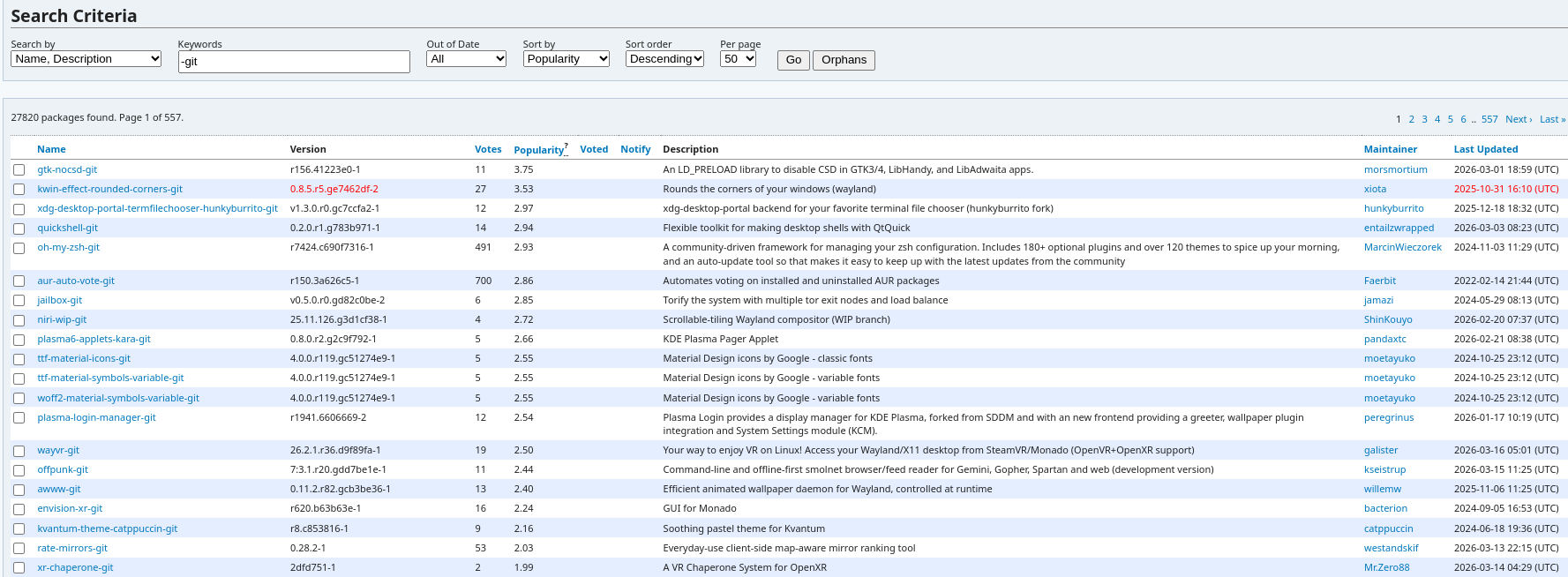
The -git packages are actually just the git repo cloned and built directly by your makepkg command. Usually they also install the source code of the project in /usr/share/. This is perfect for conquest since conquest is very having the source code ready dependant. First for changing around signatures on the fly having a copy of the source code to rebuild the package makes a lot more sense than having static binaries where you can't simply edit them. Also the C2 server builds agents for you so at a minimum it needs the source code of the agents. In our case going with a -git style AUR package made a lot of sense.
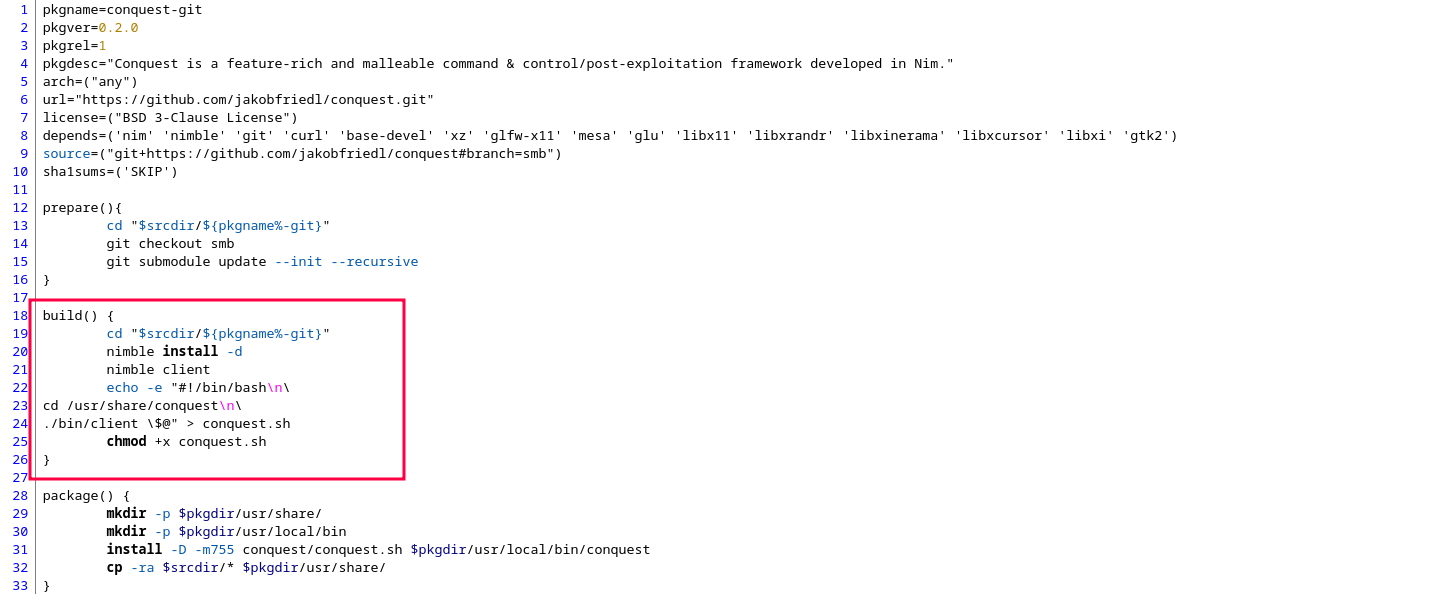
For conquest the initial package was actually super basic the idea was first to just implement the client since that has the most impact for day to day use and is a good example to get the proper development going as you can see previously in the build function it's nothing to crazy just a install of dependencies and the creation of a basic bash file to move to the project install directory in /usr/share and run of the client. Now at that time we realized that the project was very strict with if it's build in a directory you can't move it elsewhere we had a little back and fourth and got that fixed quickly.
Systemd services
With the client working it was now time to start working on the systemd implementation. Lately I have been working a lot with systemd more on that in a later blog post about p3ng0s. But to make it simple systemd is just like Windows services if you are from the windows world. Systemd is actually super powerful if you sit down and look into it.
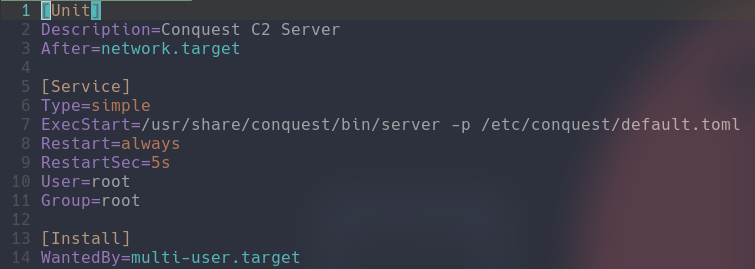
The syntax for a systemd service is actually quite simple you just need to point it to the binary of the server and tell systemd where it should be installed and what it's dependent on. Now since this project is a C2 originally we just decided to have it run as root since we want to listen on any port and we need read/write permissions on the folders in /usr/share/conquest to build the agents. Also since a C2 conquest relies on the network to be online which is why we require network.target. From this managing the service is quite simple:
          systemctl start conquest.service # Starts the server
          systemctl enable conquest.service # Enable the server to run on boot
          journalctl -u conquest.service # Get the logs of the server
From there the only thing left to do was for us to properly test everything out and publish the package with a hardened service.
Hardened Systemd Service
So in our case the server needs to listen on any interface and needs read/write on the /usr/share/conquest folder for this pacman actually has super cool features install/uninstall/upgrade hooks. Those are actually super similar to the PKGBUILD files it's just a glorified bash script
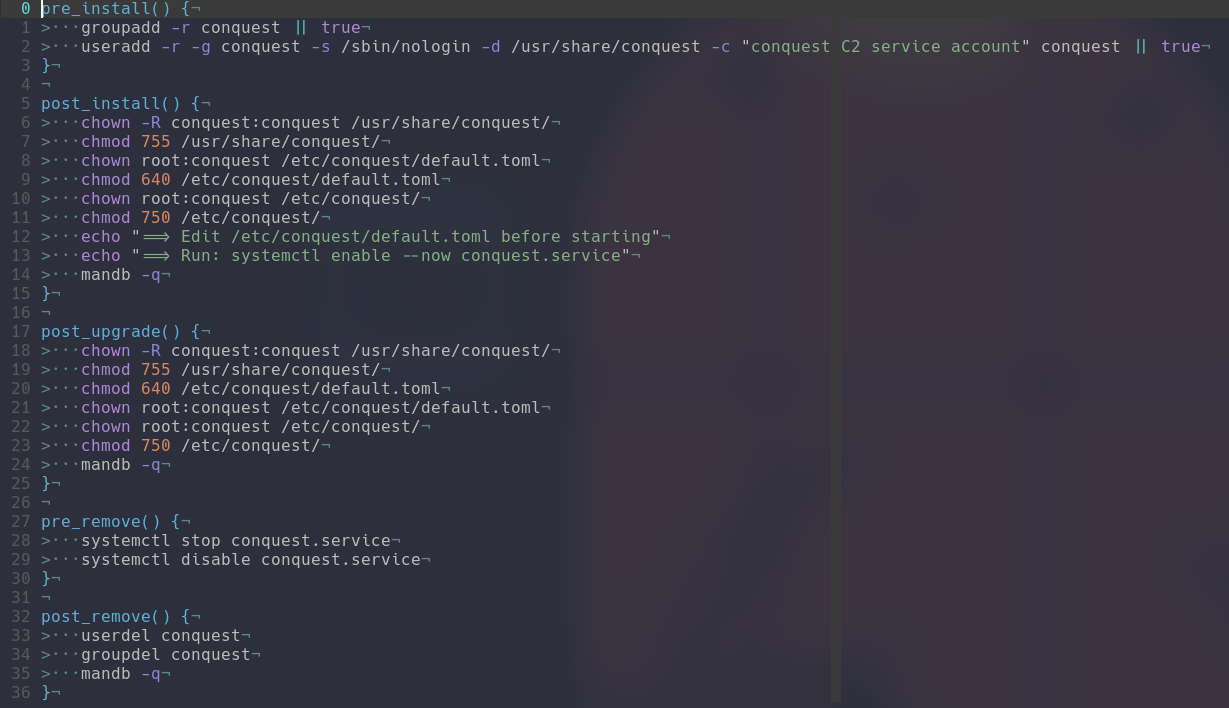
You have a few functions that are called during installation and removal of the project where you can put the system commands to create/delete the service account. The commands to set the correct permissions on all the folders. From this you can see how trivial it is to actually setup. With this new account setup we can now make a stronger systemd service that doesn't run as root. By default systemd has root access to a system so everything ran by it can have any user/group you would want. In our case the idea was if someone compromised the server through a 0day the attacker would have a bad time to break in so we did some basic stuff:
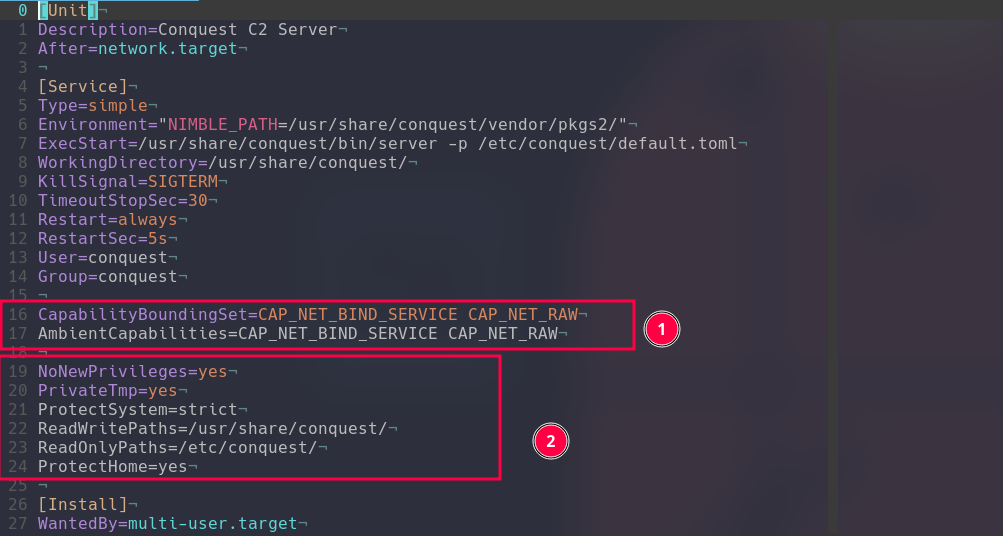
1. We actually don't give the binary any permissions to listen on any interfaces that is managed by systemd for us. When the service starts the binary gets to listen anywhere and has total control of sockets, but the second the server stops those privileges go away. 2. The service only has access to /usr/share/conquest where the program lives it cannot see /home not even /tmp. Which is honestly such a pain in the ass I wonder how someone would go around that.
Testing it out
This is rare for this blog but YOU yes YOU are you running on arch linux? You think this package is cool? Why don't you try it out. There is only one way for me to know if I did a good job and it's if you test out the package and try out jakobs C2. It's honestly a super cool project and he just released V0.2.0 its worth checking out here.

Thx for reading :) Follow me and jakob on github I will keep going at this as long as I can I really enjoy all these projects and documenting them here is fun. My next steps are finishing up p3ng0s properly this time. Expect later this year an actual release with a lot of blog posts about it since I built a lot on that project. I will also after a bit of thinking adding a chat to this website once p3ng0s is over. With the babysitting of my daughter and work I don't have as much time as I used to. But maybe in 3 years from now there will be a lot of cool tools made and a community around all this crap we are building I'd love to here your feedback once I open up a IRC chat on this website. Stay tuned ^^
Categories
Links
p3ng0s
Questions / Feedback
Stickers & Donations
If you like the content of my website you can get the amazing stickers from this websize. You can also support me through my github sponsors page.